
AI Keywording – a new contender, Cyberstock
Keywording is important!
I’ve said this many times. We love taking photos and videos, and we love earning money from those assets, but we hate the middle bit. Describing, keywording, uploading, submitting to the many agencies that can take our work. For many years, I used the low-tech approach. I used IMS Keyworder where you enter a few key words of your own, multiple matching images appear, you choose the ones that best match your image and get a combined set of keywords to paste into your image metadata. I almost always write my own titles and descriptions. Surely the magic of AI can do this far better? I have written before about my experiences, but I’ve recently been trying a new contender, Cyberstock.
Stock photo and video upload process
This bit is important as well in this discussion, because your approach will dictate which tools work for you. I keep all my photos in one Lightroom catalog (145,000 images now) and I keyword and describe them in that catalog. Only when they are completely ready to go do I export the jpegs used for the stock agencies and so the jpegs have embedded metadata in the files themselves and could be uploaded to agencies one by one in that form if you wanted to. However, there are two issues with this – one is a technical one in that Lightroom has never allowed anything other than alphabetic order for keywords and some sites – Alamy and Adobe Stock – want the most important keywords first in the list. They prioritize searches against the first 10 keywords or so. I always thought it a bit funny that Adobe wants prioritized keywords and yet does not support that in their main image management system, but there you are!
It is a valid question as to why I keyword in Lightroom rather than in various systems that take in the exported jpegs and allow keywording in their upload systems. My Lightroom catalog contains all the original image – mainly raw files and processed photoshop files – and I always want to be able to find the original if I want to upload it to a print on demand site, or reprocess it using newer technology, or resize it for a big print. The keywords embedded against those master files allows me to find them very quickly. I don’t reimport my exported jpegs back into this catalog which I guess would potentially give me this capability as that would clutter my system with duplicate images. All this means is that keywording systems that expect you to export a jpeg, upload it and have it keyworded and then it gets to the stock agencies just does not work for me.
Incidentally, I do use a bit of a work-around to solve the key keywords issue in Lightroom. Every time I come across a new thing or place, I capitalize the word. So, if I am going to Costa Rica, I add “Costa Rica” as the keyword. If I photograph a bird called a brown jay, I use “Brown Jay” as the keyword. Why? The answer will appear shortly!
The second issue is that each agency has a different approach to submission and for many of them it is a two-step process – upload the images, then visit the site to submit them. iStock takes it one big step further in requiring that your keywords match their controlled vocabulary, which is actually quite a big step!
As a result, I use StockSubmitter (or its more modern version, Microstock Plus) to handle all those issues. It allows me to look at all the jpegs ready for upload and it automatically adds categories to them. Then, in the keyword editor, I can select a whole bunch of similar images and move some common important keywords to the front of the list. It also automatically puts capitalized keywords at the head of the list, so my photos of Costa Rica will have that keyword first in the list of keywords even though alphabetically it would have been lower in the order. But critically, I can select 40 or so photos from Costa Rica and assigns the correct iStock managed vocabulary keyword to each of my entries. The end result is that I have the entire set of jpegs with at least some of the important keywords early in the list, the iStock work done, and the app then uploads and submits them without any further involvement from me. Stock photography doesn’t pay well at the best of times, and so the time saved in not worrying about uploads and submission processes is very important for me.
What about AI Keywording and its promises?
You might be thinking – what has all that information above got to do with the subject of this post? The developers of most of the systems start with the requirement that the AI system “sees” the image and so it needs to be uploaded. So naturally, their thinking is that the actual jpeg that is ready for upload gets into their system, they add the keywords using AI and provide an updated jpeg with the metadata embedded. Or they provide a csv file that can uploaded with the images. The one I have been using for the past six months or so, Phototag.ai, (affiliate link), also has a Lightroom plugin so that you can work in Lightroom directly with their system. I personally don’t like that as I like to be in control of my Lightroom database, but it does work.
The new contender, Cyberstock, takes this a lot further; by allowing the upload of both photos and videos in batches and then continuing the process by storing your ftp login details in the system and it will upload the keyworded files to the agencies for you. It promised much more besides, including the combination of an AI system with data received by external systems such as Semrush to add intelligence about the search frequency for certain words to try to come up with keywords, titles and descriptions that are tuned to include words that have a higher chance of being searched for to increase the chance of the image being found in a search.
And to add to that, they recognize that each agency has different requirements for titles, descriptions and keywords. Anyone looking for the ultimate customization would tailor their upload to match what Adobe wants, say. Adobe has a limit of 200 characters in the one Title field. So, it would make sense to pack as many keywords into that title as you can and use the full 200 characters to get the maximum exposure for your important words in that title.
Dreamstime has a limit of 130 characters in the title field and like many other agencies, also allows a description field with 200 characters (I think). However, Alamy only allows a caption and that has a limit of 150 characters. You can see that a jpeg optimized for Adobe will not be accepted by Alamy, for instance.
As a result, Cyberstock can process each image multiple times, once for each agency, and then upload the jpeg with the right metadata to the right agency. And it can do that in a hands-off batch fashion. I believe that this process is upload only. You would still have to visit each agency to submit the files using whatever steps they have designed. I haven’t tested any of this, because it just does not fit my process.
Does any of this matter in the real world?
Good question. When I first started looking at Cyberstock, the titles generated were all capitalized (the first letter of each word was capitalized. That looked pretty strange to me, and I was told this was optimized for good results on the agencies. When I looked at some best sellers on Adobe, I didn’t see capitalized titles and so I asked for a feature to remove that. I also know that apps like StockSubmitter get round some of these different standards by allowing you to upload your description rather than title to Adobe, for instance. However, to use my approach of using the same file for all agencies does require some compromise. I need to keep my title less than 130 characters for Dreamstime and I need to keep the description less than 150 characters for Alamy. So even with the use of my descriptions for the title for Adobe Stock, I still end up with a sub-optimal title in theory.
I don’t know how much this matters, to be honest. We don’t know how Adobe Stock balances the top 10 keywords with the remaining keywords with key words in the title, and how they then choose popular images versus new images in the search order. Is it worth the cost of running multiple AI metadata processes on the same image to get that optimal title? I’m betting that the answer is that it is not worthwhile, but at least Cyberstock gives you the option of making your own choice.
How good are the AI optimized titles and keywords?
This is the real test of a system. How good are the results? With my current AI keyworder, Phototag, I usually look for 30 keywords from the AI system, remove a few that I think are not appropriate (it always sees wildlife in any landscape image for instance) and then I add more words of my own.
I have to say that I found Cyberstock to be initially very unstable. I asked for the non-capitalized titles and sometimes that worked and sometimes it doesn’t. When it does work, it puts proper nouns like Costa Rica in lower case, which might not be important in a search, but a human might take it into account. There was an option for what they call Long Tail keywords, or I call compound keywords. For instance, Costa Rica should be the keyword, not costa, rica. However this option didn’t work. They worked on that, and it started work, then it put “wildanimal” as a keyword and left others like central, america as two separate words. Their system is complex to handle all these agency rules, but I think the development is not 100% there. I’m sure they will get there, but it did frustrate me a bit. On the positive side, I suggested that also creating a much more complex result that could be used for a Print on Demand site to entice a buyer into buying a print. They have that on their development plans and I’m going to work with them to help define what that might be. They have been very responsive to my questions and ideas.
Comparison with Phototag.ai
I was working on some Costa Rica pictures and thought I would use those as test cases. Not destined to be big sellers, I’m sure, but they also were more difficult to keyword than perhaps more obvious photos of well-known places. Incidentally, I use 1000-pixel images to speed the upload process and both systems worked quickly, in a couple of seconds, to give me the results.
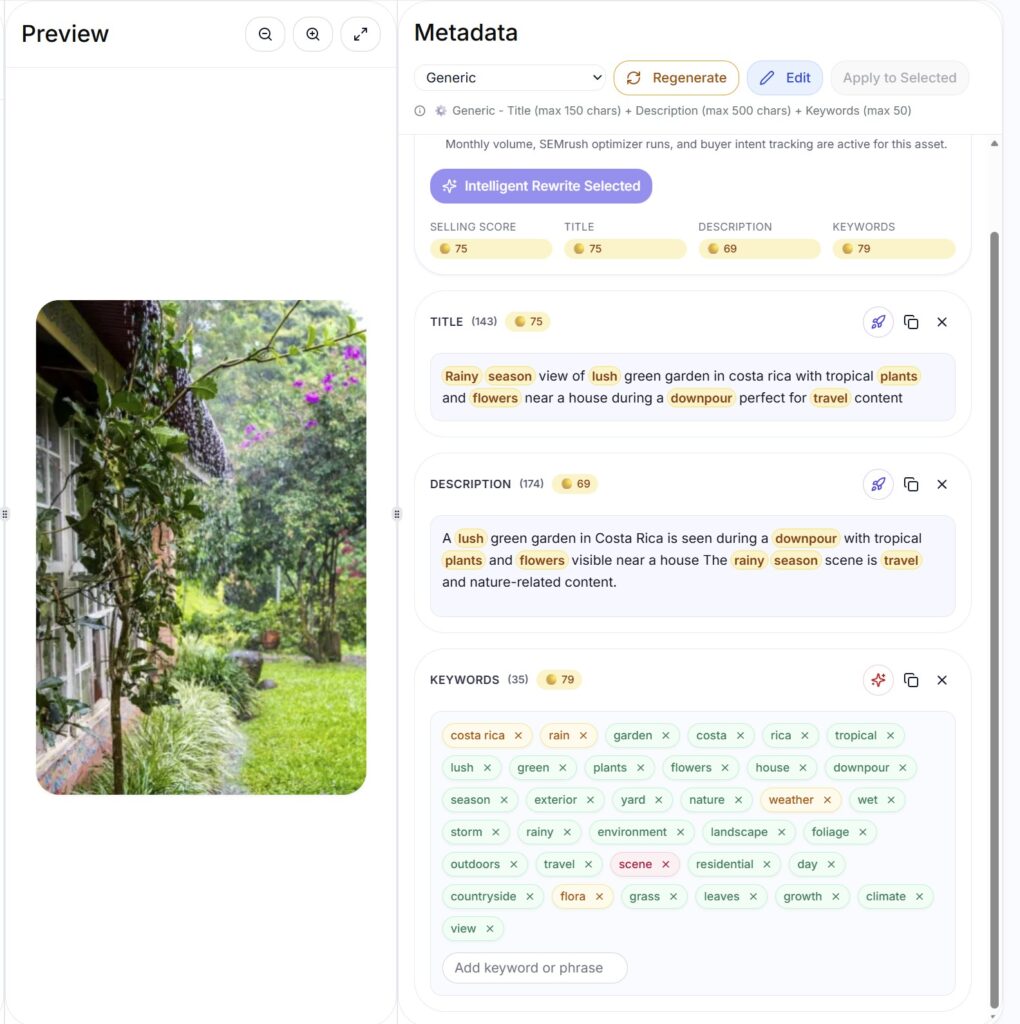
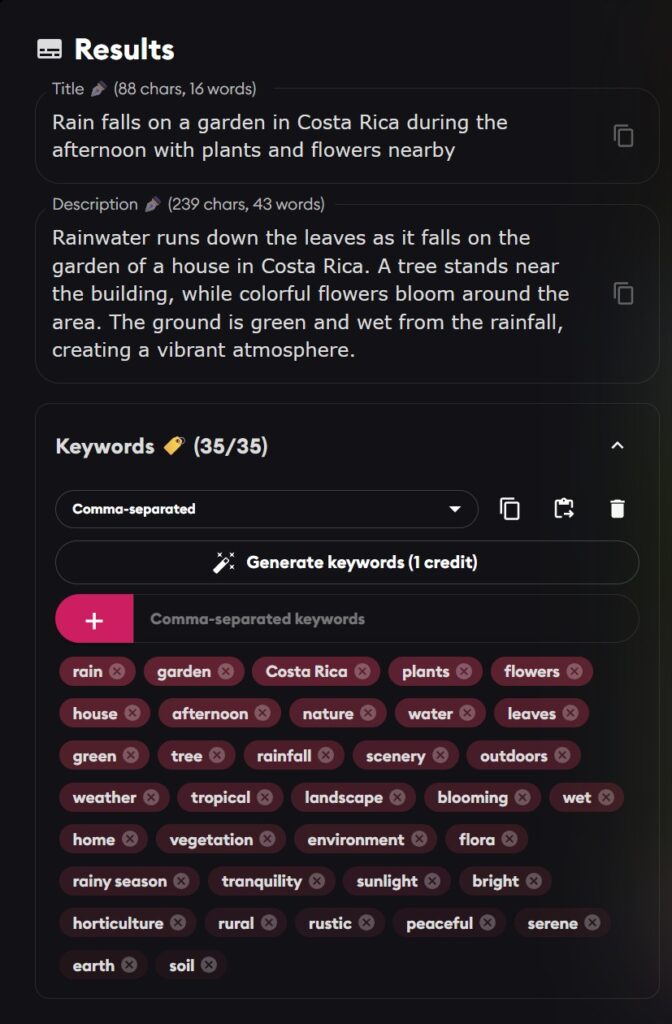
Let me say straight away that I could adjust the number of characters that Phototag.ai puts in the description. This whole exercise has helped me to understand the different constraints that agencies have, and I would now set the title to 130 characters and description to 150 characters. This also shows a related issue with Cyberstock in that there is no agency that has those specific requirements and so generating an answer for my “generic agency” was not an initial option. They did work on a solution for me by specifying a generic agency as well as the obvious ones.
However, both of these are well matched, with Cyberstock having the more “keyword” filled titles and descriptions, but they did understand what this image was and came up with good results.
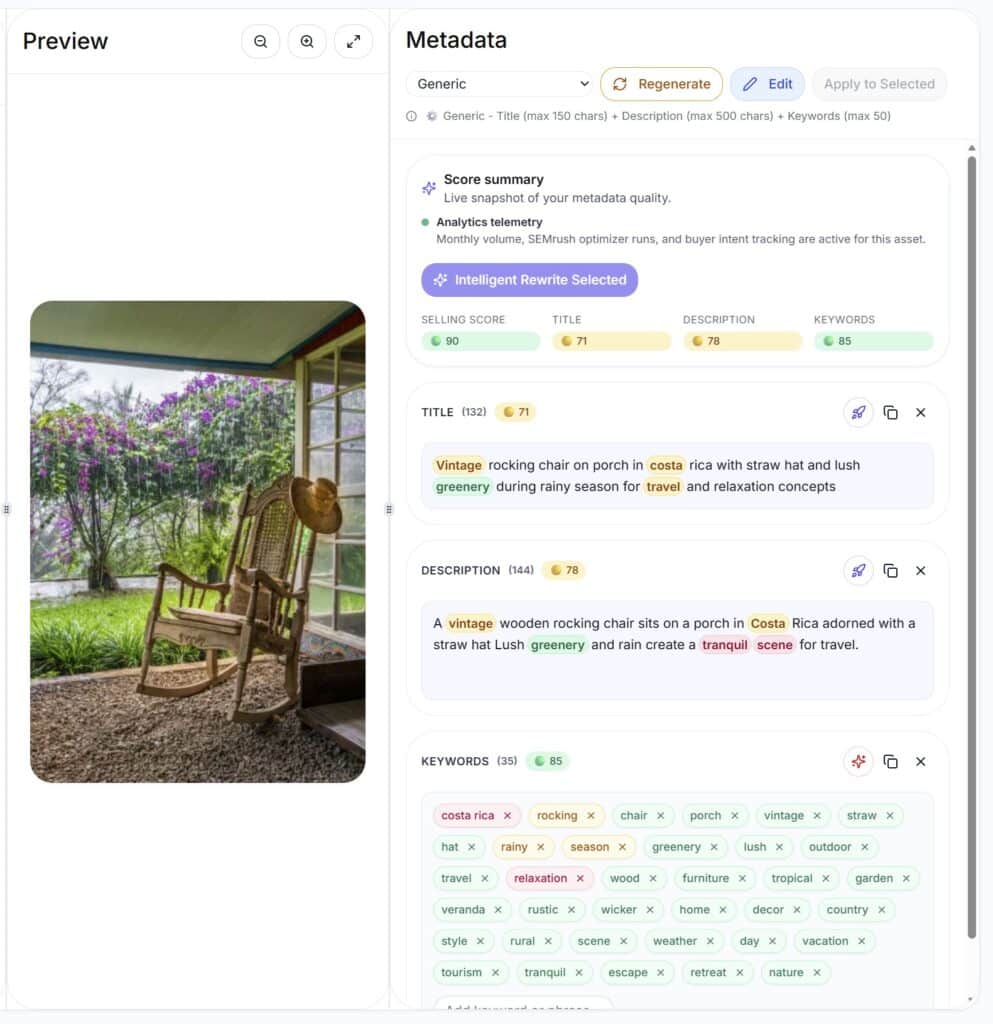
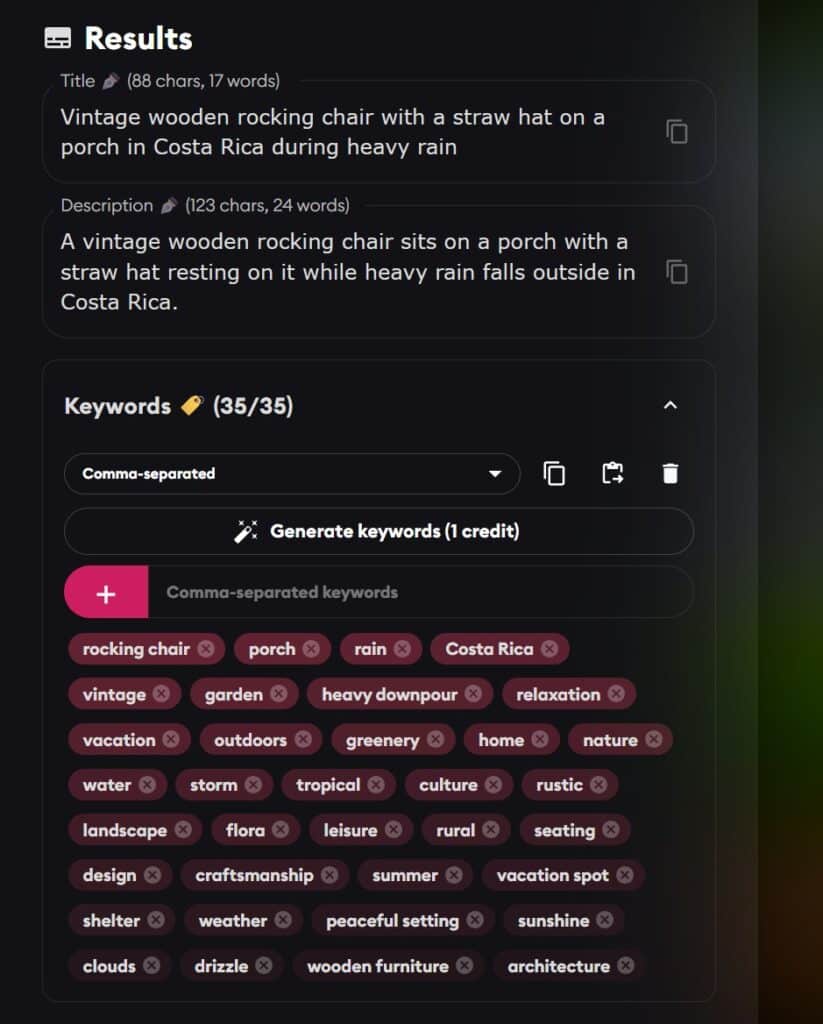
Once again, Cyberstock has many more keywords in the text fields, but missed the fact it was raining heavily outside. As a human, I would have added concepts like shelter, retirement, restful, to the keywords. Cyberstock struggled with those compound keywords again, putting straw, hat instead of “straw hat”. I think the range of compound words in the Phototag keywords is better and they had a better feel for the image.
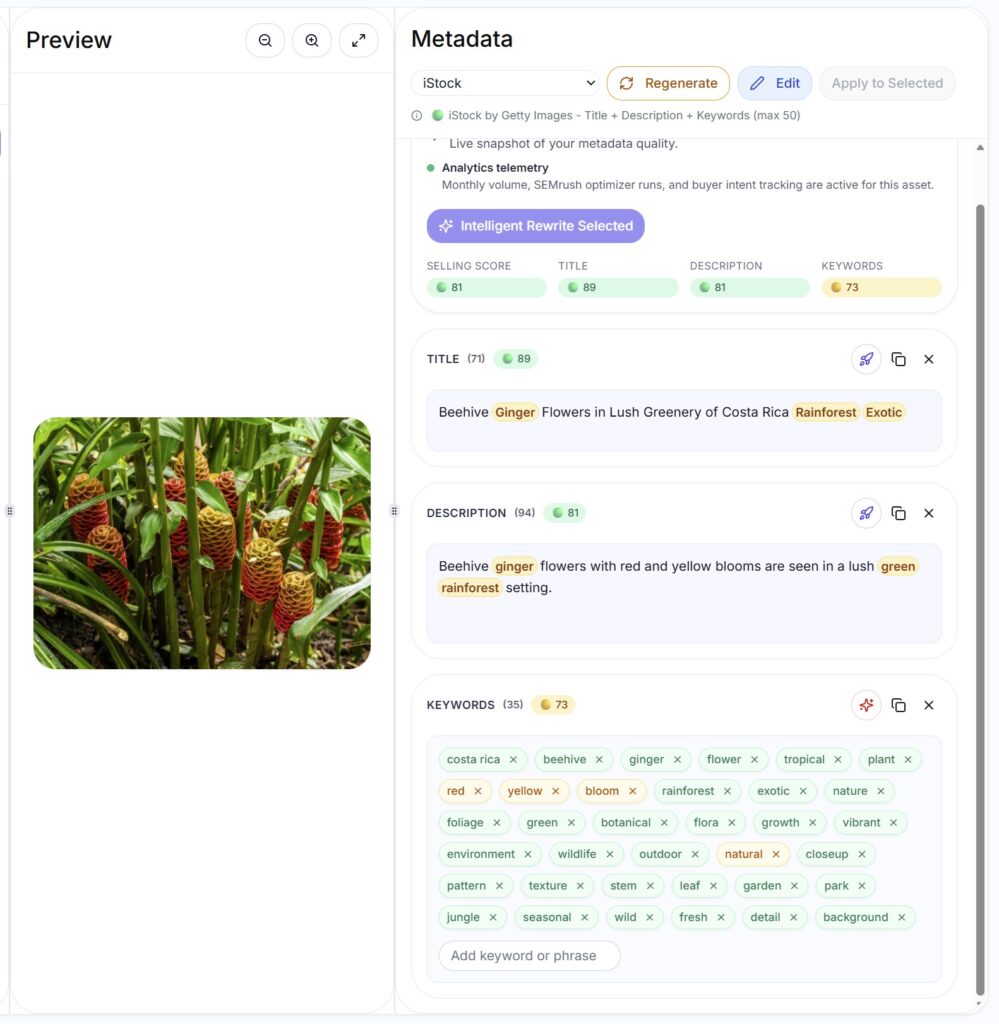
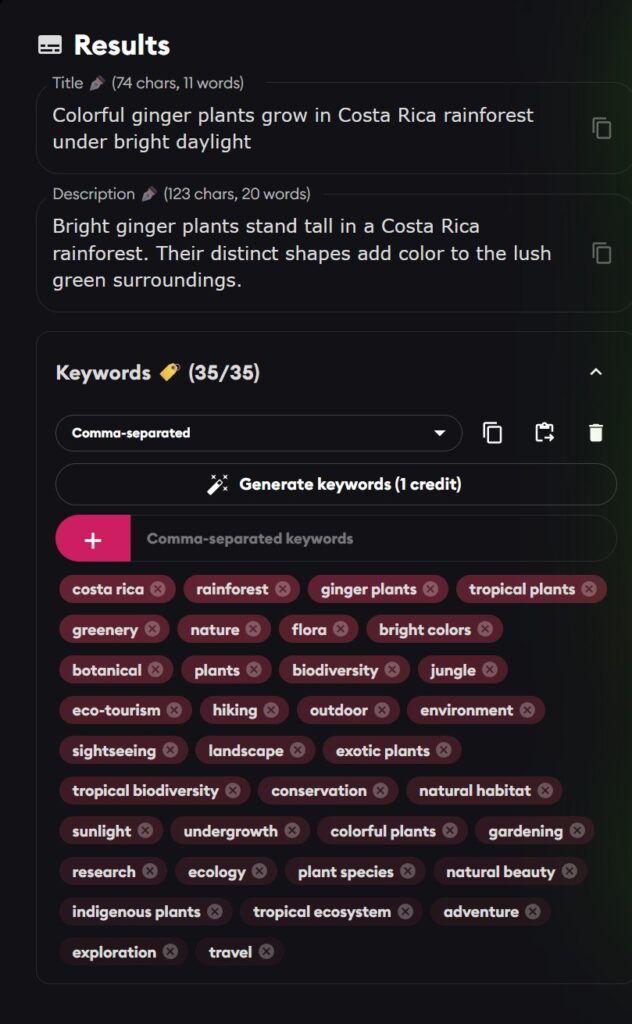
I thought I would see how well they recognized a plant. I had checked this with Google images, and it was Beehive Ginger. Cyberstock recognized that but separated the words in the keywords. So now I’m supposed to see a beehive in the image. I had chosen iStock for the agency and the title reverted to this strange capitalization again. I was also interested to see if choosing iStock would automatically come up with the controlled vocabulary that Getty uses. It doesn’t look like it and so you would have to do that on the iStock site after upload.
How about my famous cat?
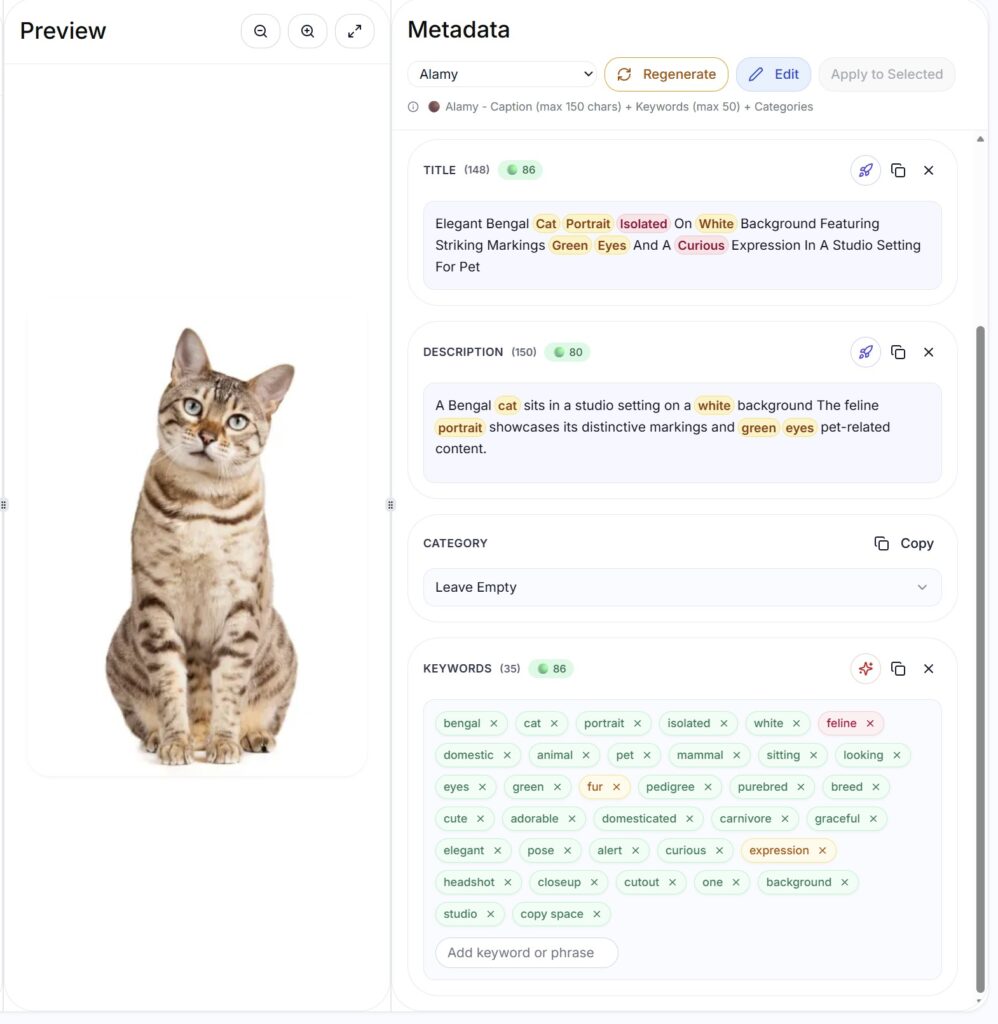
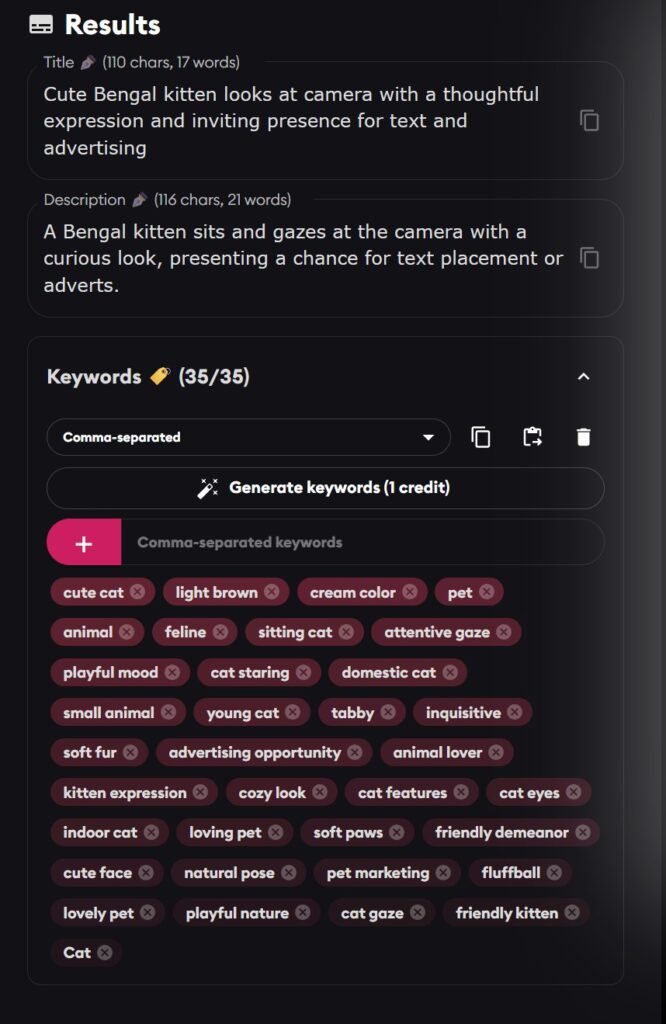
I used Alamy as the agency for Cyberstock. Title is now the strange (to me) capitalized version, but I must admit it is full of important words. I do think I prefer the compound keywords that Phototag chose, such as cream color, cute cat, cat staring and so on. Those are words that I can imagine a buyer using to get this sort of image.
Conclusions
I think Cyberstock has some interesting ideas and I am sure they can improve the consistency of the results I was seeing. I like the detailed titles and descriptions and can see myself using those. The lack of meaningful compound keywords is an issue for me. I would really like to see a new field in the future for the description that I would add on Etsy, say, to really get across the background to taking a particular image so that a buyer could feel more emotionally attached to it. Creating an Etsy relevant title would be interesting as well. The reason I’m pushing this, is that my best stock photos often end up on my print sites and so it would give me an all-in-one solution for smooth uploading to all the sites that need the images.
So, there is no clear winner, but I will continue to work with Cyberstock (although see the Update below) as they evolve the system. If you are interested in trying Phototag, is my affiliate link:
Phototag AI keywording with Lightroom plugin
Update
The guys from Cyberstock reviewed this article and sent me a long email telling me basically that I just did not understand their system, I was comparing an airplane to a bicycle and that their integration of all sorts of other sources of data was making their system so much more powerful. They also said that that paying for the Stock Submitter submission system in 2026 was nonsense. I will put their email to me and my response in two comments below in case you are interested. I was told to rethink and rewrite this article and they would help me do that. I refused, clearly, and now I see they have cancelled my subscription to the service. So, I guess I don’t think I will recommend Cyberstock!



Uncle Steve all that is overdone big time, Lightroom is stupid and Adobe wont fix it. EX ACDSEE is also moving alphabetically the keywords and is no way to change, but Bridge the simple bridge is keeping them in the order you put them in the metadata. Nieh all that is bull for me is simply, i just put the keywords in photoshop under file info each file, bridge does not change that order, or any other software problem solved. All this ai keywording is a lot of hat and no cattle. For me is simple I just put gemma 3 with vision the Captain Sparrow version with unrestricted access, i wrote a small template json style , well is like 50 words not a template really, i upload a screenshot in gemma copy past my json style request and is instant in few seconds I have Title: less than 120 characters, Description less than 200 characters, and 50 keywords. Job done and is accurate, google still have the best vision system in the safetensors. All that AI i tweak manually for locale keywords what AI wont know. Is accurate,is free, you do not need internet. Why will you play with all this AI generators, when you can have your own local in your machine ?
There is a lot of history in my approach – I used LR for 15+ years and well before prioritized keywords were a thing and the other solutions of using bridge don’t work. I understand how the keywords can get in there in a priority order (assuming I had a way back then of putting them in a priority order) but then searching for a particular image among the 145000 is pretty tricky. I can see how a local AI system could work, of course, but I’m not that keen to spend time trying to get such a thing to work – they are just something I use from time to time. Its all a matter of where you want to put your time and money, I guess.
Interesting article. Thank you for sharing. Based on your expertise Capital Letters are ok to be used for all agencies? I am using phototag.ai as well as photokeyword.ai. I found that photokeyword.ai is more accurate.
I don’t like (or use) the capital letters. I see it is an option in Phototag, but not actually a default there. But I have had images rejected in the past by iStock for too much capitalization when it has a lot of proper nouns in the title. Seems an odd approach to me, to be honest. I haven’t tried photokeyword.ai. Maybe sometime I will, but testing these things is effort and the differences are often small.
Hello,
Thank you for this interesting article. I’m interested in trying Cyberstock. I’ll sign up through your affiliate link.
My workflow is to add my metadata to exported JPG files outside of Lightroom in Stocksubmitter. Then I upload and submit them using the same Stocksubmitter.
However, I’ve been experiencing more and more problems with this program lately. Some stock agencies are constantly forcing me to log in again when using Stocksubmitter. This is probably because the security of these agencies is increasingly using Recaptcha and similar tools. I don’t think Stocksubmitter is properly maintained anymore, so the program is becoming increasingly unusable. Are you experiencing these problems as well?
Hence my interest in Cyberstock. It might offer a good alternative to adjust my workflow. The potential for AI metadata generation would be a nice bonus. And I might be able to manage my JPGs locally on my PC with Xpiks. But I still need to investigate that. I’ll run some tests with Cyberstock, and who knows what that will yield…!?
Kind regards, TW van Urk
I’d be interested to see how your experiments go! I do see several agencies that Stock Submitter is struggling with. Pond5 is a real problem with its sliding puzzle captcha. I also use the Microstock Plus part of Stock Submitter and so I go there to the agencies and solve the Pond5 puzzle (you do it 20 times or so) and then I can select all the images that have failed to go to Pond5 and upload and submit them all in one go. There are no upload limits on Pond5 in the system. Then Pond5 works from Stock Submitter for a time. 123RF seems to be permanently out of action but sales are so slow there it makes no difference. I don’t really have any other issues with it, to be honest.
I’ve never tried Microstock.plus. Does it have fewer login issues than Stocksubmitter?
It is supported by the same team and is probably their preferred long term solution. No extra subscription required. You can basically add Microstock.plus as an agency in Stock Submitter and it uploads all the images only to this agency and stores them in their cloud solution and then uploads to agencies from there. So much faster from your perspective as there is only one local upload. I wrote about it a long time back here: https://backyardsilver.com/microstock-plus-easier-uploading/
I have the same thing with Microstock Plus. I loved it, and used it very heavily for years, but lately the upload to the different agencies have been dropping one by one. 123RF & Dreamstime are, as you mentioned, slow selling, so not that big of a deal, but then Pond 5, and now I have now way even to upload to Shutterstock anymore. And that’s a real dealbreaker for me. So on the outlook for something new, and haven’t found anything yet to be honest (even thinking about building my own).
It was 123RF that I mentioned as being out of action – I don’t have issues with Shutterstock or Dreamstime. The way I handle Pond5 is to ignore it for a while, then go to Microstock Plus and reconnect Pond5. Sometimes I have to do that sliding puzzle thing a few times, but it usually then connects. I then upload all the Pond5 images in one go – sometimes 500 or so as there is no limit on submissions to Pond5. Those get accepted then by Pond5. The upload to that agency then seems to work for a week or two and I upload to it normally until it stops. Then repeat!
The agencies are really making these automated upload systems work hard to connect – so I can imagine the Microstock Plus people work hard to make this work.
Steve
Yes, thanks, that’s a handy tip! But before I waste my time on it, the big question remains: is Microstock.plus less prone
to login problems than I currently have with Stocksubmitter?
I think it is better at solving the Pond5 issue. And, with all the images visible on the Microstock Plus page, you can select a big stack of them, it will show if they have gone to Pond5 and you can simply select that agency in the list and submit them all in one go. I’ve never found that as easy in the desktop app. So I basically always use the desktop app (StockSubmitter) and send the files to Microstock Plus without every visiting that site. If I make a mistake such as not assigning a batch to files in StockSubmitter for iStock, I can go the Microstock Plus, add a batch name there and submit to iStock from there, and if I notice that Pond5 no longer works, I go to Microstock Plus, reconnect to Pond5 and solve some puzzle, and then select all the ones that have failed to be uploaded and submit them. So I work the two systems in parallel I guess, but most of my time is in the desktop. They are the same solution basically, but they have their pluses and minuses.
Comments from Cyberstock on my review above:
Comparing us to Phototag is like comparing an airplane to a bicycle. Yes, both can get you from point A to point B, but the principles and the results are completely different. Phototag is just a simple AI wrapper that anyone can build. We are offering a completely different level of technology.
Here are the key points you missed that make us a revolution for stock photographers:
Real Data, Not Just Descriptions: We utilize 50 million data points from real buyers, signals from Semrush, and we work closely with Google. This means our titles and keywords aren’t just “what the AI sees in the picture,” but exactly what buyers are searching for right now. We provide the latest trends. No one else has this.
Capitalization: You noted that the capitalized words looked strange. This is intentional! Our data shows that this format sells better and stands out in search results. Every capitalized word is treated by algorithms as a distinct keyword entity. However, we listen to users: we have already added the option to switch to standard sentence case to satisfy everyone. But our base functionality works perfectly as is for maximizing sales.
Analytics & Insights: You completely ignored our powerful analytics. If you hover over any highlighted word, we show trends and data from Google Trends. This is a critical tool for understanding the market that was not highlighted in your review.
Speed: We are the fastest on the market. No one else offers this processing speed.
CyberPusher & Cost Efficiency: You mentioned Microstock Plus, but paying for a subscription for submission in 2026 is nonsense. We have CyberPusher, which allows you to add any FTP platforms and push content for credits. This is much cheaper than any subscription model.
Pricing: Our services are cheaper than the competitors, and we give out more credits.
All the “minor issues” you mentioned are being fixed or are already resolved. We are constantly working on improvements. But the main issue is that you presented us as just another ordinary service, whereas we have built a top-tier product with no market equivalent.
My recommendation to you: please rethink the article and rewrite it. Show people that this isn’t just “another AI,” but a real revolution in stock photography.
My response to their email:
Interesting perspective, but not really the perspective that I have as a stock photographer. Maybe I am jaded by years of uploading, but the game is very much a game of volumes and minimizing the time spent to justify doing it in the first place. I can understand that you are using signals from Semrush, data points from real buyers and so on, but the end result does not seem to me to be particularly different from what I would come up with myself and to be honest, I am not at all interested in hovering over a word to see trends and data from Google. It makes zero difference to me if there are trends in a particular set of keywords – I am uploading an image that might sell this year, might sell next year, I just don’t know. I’m getting a lot of sales just now of a photo I took in Nuuk in Greenland. I wandered over that city taking photos, because I enjoyed it, but I didn’t really expect many sales. Now the words I used in the keywords are trending pretty significantly.
I have already taken the photos when I come to keywording and so understanding whether they fit a market trend is not “a critical tool” for me. I can understand that you can do market research before taking photos of a theme, but it is too late at the keywording stage.
Speed – I didn’t see a difference between your application and Phototag. Both were a few seconds from when I started the upload.
Capitalization could help sales – I can see why you are saying that, and I will try that for some images, but sales are so random sometimes, that it is hard to notice the impact of a change like that.
I can see how you can upload the files smoothly to the agencies with CyberPusher, but unless I am missing something, you don’t actually submit the files on the agency websites. That is what I pay Microstock Plus for. It saves me time and an annoying bit of effort to visit those agencies. I would accept there are fewer agencies now that are worth bothering with and so the benefits are reducing over time.
As for the minor issues – I understood your system was well established, but I came across issue after issue to be honest. Even today I uploaded an image and got a very poor result in my mind. Still issues with compound keywords and the system missed what I think the image is trying to say. The second image is what this human came up with.


Steven: Do you still upload to FAA & Etsy? If so, do you use an AI tool to identify titles, description, keywords prior to so doing? You seem to be stating that you only send to these sites if your images do well on stock agency sites. I’m not doing stock, so am trying to figure out how to leverage your knowledge to use on FAA, Etsy, and Smugmug.
Yes. I do the stock uploads first as I can do that as soon as I have keyworded the files. As I said in this article, I’m still not very impressed with the quality of AI systems, but they are OK to get the basic 30 keywords or so. I then manually add my own keywords based on what I think people might search for. I almost always make up my own titles and descriptions. That is sufficient for stock agencies. A bit later, I look at the images and try to picture them on a wall and select ones that I think are my best of a particular subject. I focus more on locations and scenes that people might search for wall art. For instance, putting lots of Greenland images online for prints is probably a waste of time. Very few people would look for those for their wall. I upload all the ones I select to Pictorem and FAA. Etsy is different – there is a lot more work putting one image on Etsy and so I am even more selective and, to be honest, I struggle a bit with what to upload. If an image on a stock agency starts to get lots of downloads, then that might prompt me to think it might work on Etsy, but it is rarely that simple. Not sure if you bought my book on fine art photography but there is a lot more in there.
Thanks for the reply Steven. Yes, I’m a proud owner of your book. And if I can find any time between traveling and honey-do’s, I hope to get back to doing what I love – turning my photos into art and posting them. As you said it’s a lot of work to keyword. I’ve used ChatGPT a couple times as well has having purchased a Controlled Vocabulary and process from another source (that I don’t immediately recall the name of). I’ve liked most of the keywords Chat recommended, but I’ve yet to devote the time needed to actually be serious. I don’t even envision myself doing stock and have minor success with wall art via FAA, but I like posting my images for myself to look at – especially on Smugmug as well as Adobe Portfolio, and hope others will eventually stumble upon them.
I think it is important to add some keywords in addition to the AI ones to reflect what the image means to you. Does it feel like it would bring back happy memories for someone and could you add a keyword or description to say that. Your task is a little easier as stock agencies don’t allow extended descriptions, but the print sites do, so make use of the description to expand on what the print represents. You can add ChatGPT to give you 200 words on how you could best describe a particular print to a potential buyer and just paste that into the description. I do recall someone doing a lot of experimenting with Smugmug and how well Google and others were indexing them – he wasn’t impressed at the time. Try searching for some set of words that might be quite unique to one of your photos on Smugmug and see if it comes up in the search results in the text area or Google Images. If it doesn’t then no-one will ever see it!
Great advice. Thank you.