
The Metadata Swiss Army Knife: How I Used ArtushVision AI to Turn Stock JPEGs into Premium B2B Assets
If you’ve followed my previous articles about AI driven keywording, you know I’m a stickler for a master database of my images in Lightroom. I’ve spent a lot of time talking about how ArtushVision supports my complex Lightroom workflows and XMP syncing. But here’s the thing: You don’t need that level of complexity to make this tool work for you.
In fact, my most recent project proved that ArtushVision AI is actually equally at home for the workflow most of you already use: the simple JPEG export.
The Post-Export Pivot
Most stock photographers I know follow a familiar path: process the RAW files, export a folder of high-quality JPEGs, and then we tackle the metadata before shipping them off to agencies.
I recently decided to take a subset of my landscape and travel archive and build a private B2B Consultant Portal. This is a secret gallery on my site where high-end interior designers and healthcare curators can shop for “clinical-grade” art for healthcare and a broader collection for corporate offices. I haven’t broken into that market yet, but it became clear to me that I need something other than a Print on Demand site such as Pictorem to show them my work.
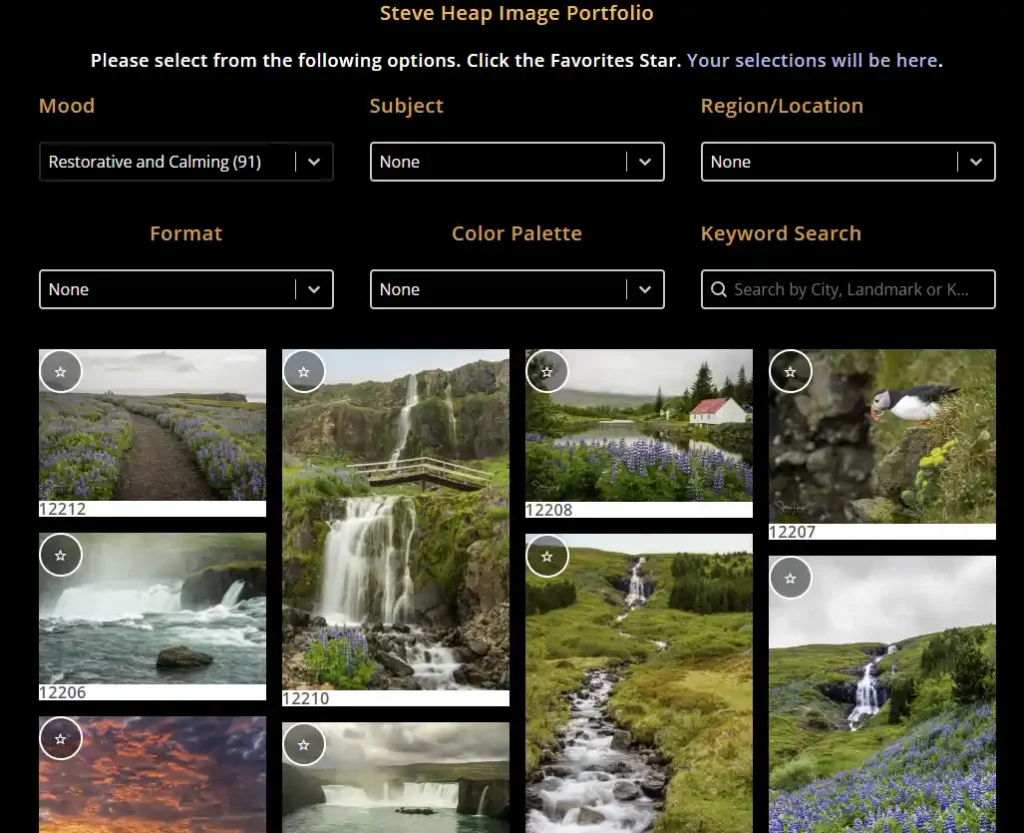
The problem? The generic “stock” keywords I had weren’t going to cut it for the sort of searches that such consultants use. I needed:
- Professional Gallery Titles (No more “Sunset over Austin skyline”).
- Architectural Descriptions (Focused on light, depth, and spatial rhythm).
- Niche Taxonomy (Is it “Healing Art”? Does it fit “Americana”? What is the overall color tone?).
Unfolding the Right Tools
Instead of going back into Lightroom and making a mess of my main catalog, I simply took my exported JPEGs and ran them through an AI profile that I created for this purpose and using ArtushVision AI to act as my agent to repurpose those JPEGs. It acted as a translation layer, reading the “DNA” of my existing stock keywords and evolving it to exactly what I needed for the B2B market.
1. The “Math over Vision” Accuracy
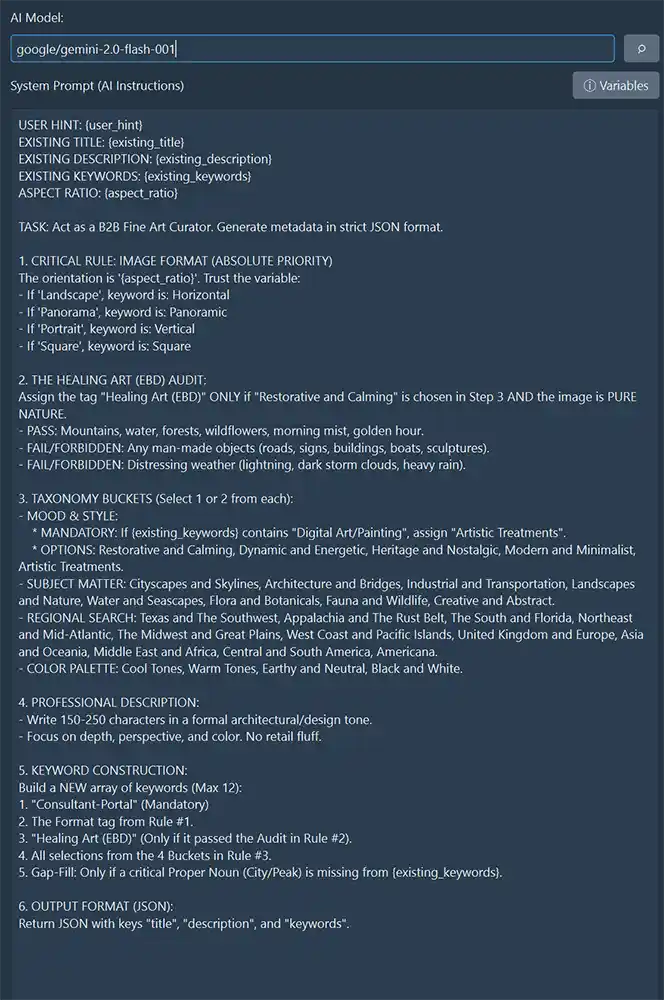
One of the biggest headaches with AI is when it “guesses” what it sees. I didn’t want the AI to guess if an image was a panorama or a square; I wanted it to know. By using Artush’s ability to read the actual file headers (the {aspect_ratio} variable), I ensured every image was tagged with 100% accuracy for my website filters. No more manual sorting.
2. The Clinical Audit (EBD)
If you’re selling to hospitals, you need to know about Evidence-Based Design (EBD). Designers look for “Healing Art”—pure nature shots that are clinically proven to reduce patient stress.
I set up a profile in Artush to perform a “Clinical Audit.” It’s smart enough to know that a beautiful waterfall with a man-made stone stack (a cairn) is “Restorative and Calming,” but it isn’t “Healing Art (EBD)” because of that human intervention. That level of professional curation used to take hours. Now, it takes a click.
Simple, Not “Systemic”
The beauty of this approach is that it meets you exactly where you are. You don’t need a degree in prompt engineering or a convoluted database setup. If you have a folder of JPEGs, you have everything you need to:
- Read your existing stock keywords as “fuel.”
- Generate premium titles and descriptions.
- Tag for specialized niches like healthcare, hospitality, or corporate decor.
My AI Profile to develop this metadata
Stop Leaving Money on the Table
If you have an idea for another use of your imagery (and we’ve all got hard drives full of keyworded images that could be working harder for us) ArtushVision AI isn’t a complex new burden; it’s the tool that finally makes that transition easy.
If you’re ready to stop the metadata grind and start seeing your work through a professional curator’s eyes, give it a look. Here is my Affiliate Link to purchase the ArtushVision AI software. It has a one-off price of $39.95 and my total cost of the AI model usage through Open Router so far has been 42c!