
Selling More Prints: Automating Fine Art SEO Metadata with ArtushVision AI
In my last post, I did a deep dive into how I am using ArtushVision AI to automate my Lightroom Classic keywording workflow for stock photography. It solved a massive headache by reading and writing directly to .XMP sidecar files—meaning my RAW files stay untouched and I don’t have to export a single JPEG just to generate keywords. It works just as well for those who just keyword the JPEGs for upload to the agencies.
But as any photographer who shoots both stock and fine art knows, what works for Shutterstock will absolutely fail on Print-on-Demand (PoD) sites like Pictorem or Fine Art America. For a long time I took the easy way out and uploaded my images with their existing stock titles and descriptions directly to Pictorem and Fine Art America which pretty much means that Google Image Search will ignore them as many of the details will duplicate what is already indexed on Adobe Stock, say, and Google will show that file rather than confuse the search results with multiple duplicate results. I dug further into that question of why your fine art prints are not being indexed by Google in this article.
Stock buyers want facts (Who, What, Where). Print buyers want feelings (Mood, Decor, Occasion).
If you upload a photo to a fine art site with a title like “Horizontal photo of brick building Texas”, a print buyer will never find it. They aren’t searching for bricks; they are searching on Google for “meaningful alumni graduation gift” or “historic architecture wall art.” Here is how I set up a second, highly specialized profile in ArtushVision AI to automatically translate my dry, factual stock metadata into highly searchable, emotionally driven SEO metadata for print sales.
The Google Search Reality: The “Truncation Trap”
When you are trying to sell prints, you are at the mercy of Google Search indexing and the layout of the PoD platform. Through testing, I found two critical formatting rules you must follow if you want your art to be seen:
1. The 60-70 Character Title Limit Most print sites will truncate your title if it is too long. If your title is 100 characters, sites like Pictorem will strictly cut the title after 64 characters and this shortened title will form the URL for the image as well. So, you get “PANORAMIC PHOTOGRAPHY OF AUSTIN SKYLINE WITH NEW SKYSCRAPER REFL” as the title and URL. If your most important SEO words are after this point, they are just dropped. Your titles need to be punchy, elegant, and strictly under 64 characters.
2. The Inverted Pyramid (The 140-Character Hook) When a buyer lands on your image page, the platform usually hides the bulk of your description behind a “Read More” button. Typically, only the first 140 to 150 characters are visible by default. Therefore, your first sentence must contain the main subject, the location, and the overarching mood to hook the buyer instantly. The description can continue beyond this point, but Google (and perhaps the searching buyer) will give the rest of the paragraph a lower priority.
The AI Challenge: “Dynamic Buyer Intent”
When I first started building this AI profile, I ran into a classic AI problem: “Example Anchoring.” I told the AI to suggest gifting occasions, and I used a university building as an example. The AI instantly decided that every photo I fed it was a graduation gift—even pictures of waterfalls!
To fix this, I had to force the AI to be dynamic. I instructed it to look at the existing stock metadata, figure out the true subject, ignore distracting foreground elements (like a random winter tree blocking a building), and generate my longer description and then 10 new keywords focused entirely on Buyer Intent.
The Before & After
To see how powerful this is, let’s look at an image of a university building.
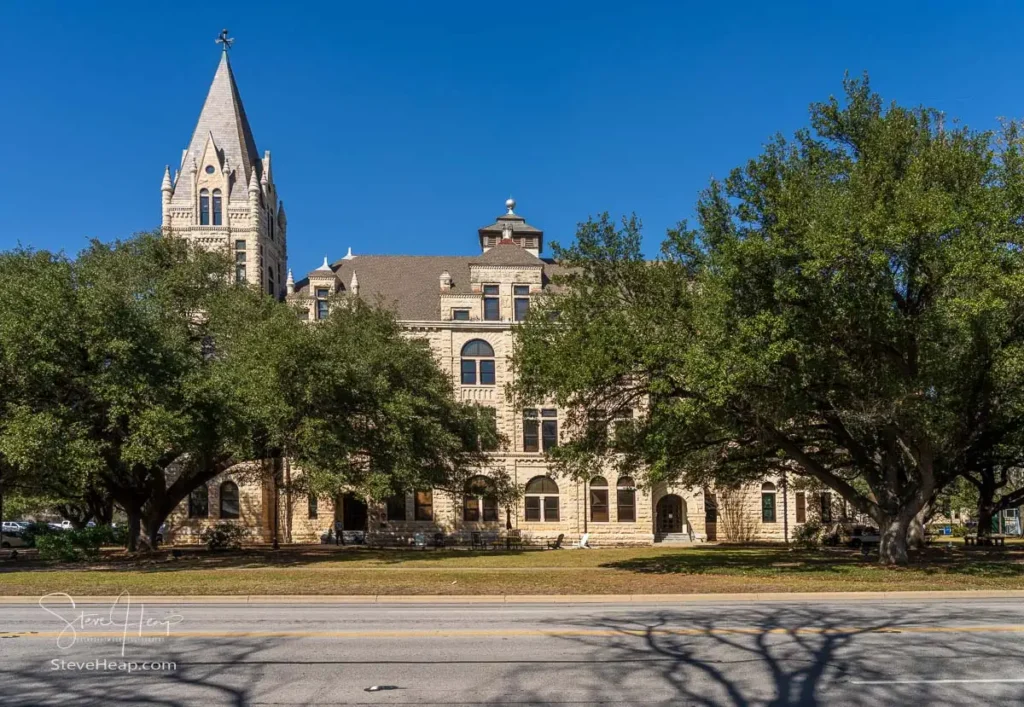
My Original Stock Metadata (Dry & Factual):
- Title:
Southwestern University or SU campus in Georgetown Texas - Description:
Georgetown, TX - 19 February 2026: 1900 built Cullen building on the historic private college campus of SouthWestern University or SU
The ArtushVision Fine Art Output (Emotional & SEO-Rich):
- Title:
Southwestern University: Cullen Building(Perfectly under 60 chars) - Description:
Capture the timeless beauty of Southwestern Universitys Cullen Building in Georgetown. This historic building exudes gothic charm and academic spirit. Arched windows catch the sunlight, while the limestone facade whispers tales of tradition. The spire rises majestically. A serene portrait for scholarly souls, alumni, or anyone captivated by collegiate grandeur, a testament to Texas heritage. Makes a deeply meaningful graduation gift, a nostalgic alumni keepsake, or a classic addition to a home office. - New Keywords Added:
graduation gift idea, alumni present, office wall art, interior design decor, nostalgic keepsake, historic architecture print, collegiate decor, study room art...
The AI took my factual base, stripped out the clinical stock dateline, wrote a beautiful 140-character hook, and then seamlessly appended high-value decor and gifting tags directly into my Lightroom XMP file.
Testing on a vintage classic car print
Without changing anything about the AI prompt, I just ran the AI model next on this totally different image of a vintage classic car. And you will see the new title and description below.

- Title: 1959 Dodge Royal: Turquoise Tailfin Dream
- Description: Elegant turquoise and chrome 1959 Dodge Custom Royal detail, a symbol of classic Americana design. Gleaming chrome accents catch the sunlight, highlighting the space-age rocket taillights. The cars impeccable restoration shows off its iconic fins and sparkling finish. A nostalgic trip back to the opulent 1950s. Perfect for a vintage car collectors office, or a statement piece in a retro-themed living room. A thoughtful gift for classic car enthusiasts.
The “Copy & Paste” Fine Art Profile
If you want to use this exact workflow, open your ArtushVision AI app, create a new Custom Profile, and paste the following JSON instructions into the prompt box.
USER HINT: {user_hint}
EXISTING TITLE: {existing_title}
EXISTING DESCRIPTION: {existing_description}
EXISTING KEYWORDS: {existing_keywords}

TASK: Act as a professional Fine Art Photography curator and SEO expert for Print-on-Demand platforms. Generate metadata in strict JSON format. Use ENGLISH ONLY and ASCII characters.

1. BUYER PSYCHOLOGY & TRUE SUBJECT FOCUS:
- TARGET AUDIENCE: Interior designers, gift buyers, and fine art collectors.
- SOURCE OF TRUTH: You MUST use {existing_title}, {existing_description}, and {user_hint} to identify the true main subject of the artwork. Ignore any datelines present in the existing text.
- ANTI-DISTRACTION: Focus on the true architectural, abstract, or landscape subject. Do not hyper-fixate on prominent foreground elements (like trees or vehicles).

2. TITLE FORMATTING (SEO OPTIMIZED):
- FOCUS: Transform the factual existing metadata into an appealing, artistic title. Make it sound like an elegant piece of art.
- LENGTH TARGET: You MUST utilize the available space to be highly descriptive. The title should be between 60 and 70 characters long (Absolute maximum 70 characters).

3. DESCRIPTION FORMATTING (THE INVERTED PYRAMID):
- LENGTH TARGET: The description MUST be highly detailed, vivid, and substantial. You must write between 450 and 600 characters. Do not write short descriptions.
- THE HOOK (CRITICAL): The first 140 characters MUST contain the main subject and overarching mood. This is the only part visible before the "Read More" button.
- THE VISUAL STORY: Elaborate extensively on the visual aesthetics—colors, light, textures, and the general atmosphere of the scene. Make the reader feel like they are standing there.
- DYNAMIC BUYER INTENT & OCCASIONS: End the description by suggesting decor placement and gifting occasions tailored SPECIFICALLY to the subject matter. (Examples: For a landscape: "Perfect for a rustic cabin or nature lover's living room." For a university: "A meaningful alumni gift." For abstract architecture: "A bold statement piece for a modern corporate office.")
- CONSTRAINTS: Maximum 600 characters total. Do NOT include dates, datelines, or camera settings.

4. KEYWORDS (APPEND EXACTLY 10 DYNAMIC BUYER INTENT TERMS):
- PRESERVE EXISTING: You MUST include every single tag currently found in {existing_keywords}. Do NOT change, delete, or overwrite them.
- DYNAMIC BUYER INTENT TERMS (10): Generate exactly 10 new, multi-word keywords focused entirely on *why* someone is buying this print and *where* it will go. Adapt these strictly to the genre of the photo (e.g., use "nature lover gift", "modern office wall art", "alumni keepsake", or "nursery room decor" depending on what logically fits the image best).
- FORBIDDEN WORDS: Do NOT use stock-centric terms (e.g., copy space, blank, template, editorial).
- FORMAT: Capitalize proper nouns. Keep compound multi-word phrases intact.

5. OUTPUT FORMAT (JSON):
Return a valid JSON object with these keys:
- "title": Artistic, SEO-friendly title (Between 60-70 characters).
- "description": Vivid fine art description with a strong 140-character hook, visual story, and DYNAMIC gifting suggestions (Between 450-600 characters).
- "keywords": A JSON array containing all original tags from {existing_keywords} PLUS exactly 10 new dynamic buyer-intent keyword strings.
(Note: This profile uses your existing stock title and description as the “Source of Truth” to prevent the AI from hallucinating).
Creating SEO friendly metadata for prints without the stock photo keywords
Of course, not everyone is starting from images that already have been described and keyworded. Many fine art photographers and artists are starting with the image and nothing else. Luckily, ArtushVision AI is highly capable of following the outline of the AI rules above to generate an SEO friendly set of metadata directly from the image itself plus hints that you provide about what the image is about.
One Catalog, Two Workflows
The beauty of this system is that I can maintain one Lightroom catalog. I generate my stock metadata, export the JPEGs for upload to the stock agencies, then I have a choice to make. I can swap to this Fine Art profile in ArtushVision AI, overwrite the XMP data, which updates my Lightroom catalog and export the high-res files ready for upload directly to Pictorem and Fine Art America. Alternatively, and I think I will tend to stick with this approach going forward, I can export my files into highest quality jpegs with their “stock” keywords and descriptions and then point ArtushVision AI at this export folder on my hard drive. Running my Fine Art profile will now directly update the metadata in those exported Jpeg files without impacting the picture data. That is closer to how most people use this flexible keywording systems for stock photography.
Either way, I have no duplicate RAW files, no copy-and-pasting in browser tabs, just a bulletproof workflow.
Learn More about ArtushVision AI
My full test report on this flexible AI keywording system is here, but if you want to investigate it directly on the developer’s site (and perhaps buy it at the current low price of $39.99, please use my affiliate link to find out more.


I have been in stock photography since 8×10 B&W era, so keep me posted with your reports!
That is a long time! Yes, I will keep these things coming!