Keyword strategies for stock and fine art prints
I have been spending a lot of time recently keywording all the images from my recent trip to Europe, all for stock agencies and then some of them destined for Fine Art America and Pictorem. I haven’t got to the end of the files yet, but 582 files are stock photo worthy, and I have keyworded 350 of those.
It will be no surprise that I am using ArtushVision AI for this, but I wanted to explain two enhancements I have made to my process which I think will make the files more likely to be found, which is really all we want from a keyword system.
Keywording Efficiency
My process is honed to maximize my time now. I add the general context to the hint area of the App, such as “Chester, Cheshire, UK” and then add one or two keywords to an individual file if it needs more, such as “Queens School”. One click of the AI button gives me 35 appropriate keywords plus the title and description, whose lengths are designed to fit within the constraints of the stock agencies I work with. The cost is around $0.001 per image, so although I sometimes copy/paste to identical images (again a one-step process), I often run the AI model for each image. I guess I am spending perhaps 1 minute per file as I do look at the keywords and sometimes type in something I think might have been missed.
Stock Photo Metadata – adding more context
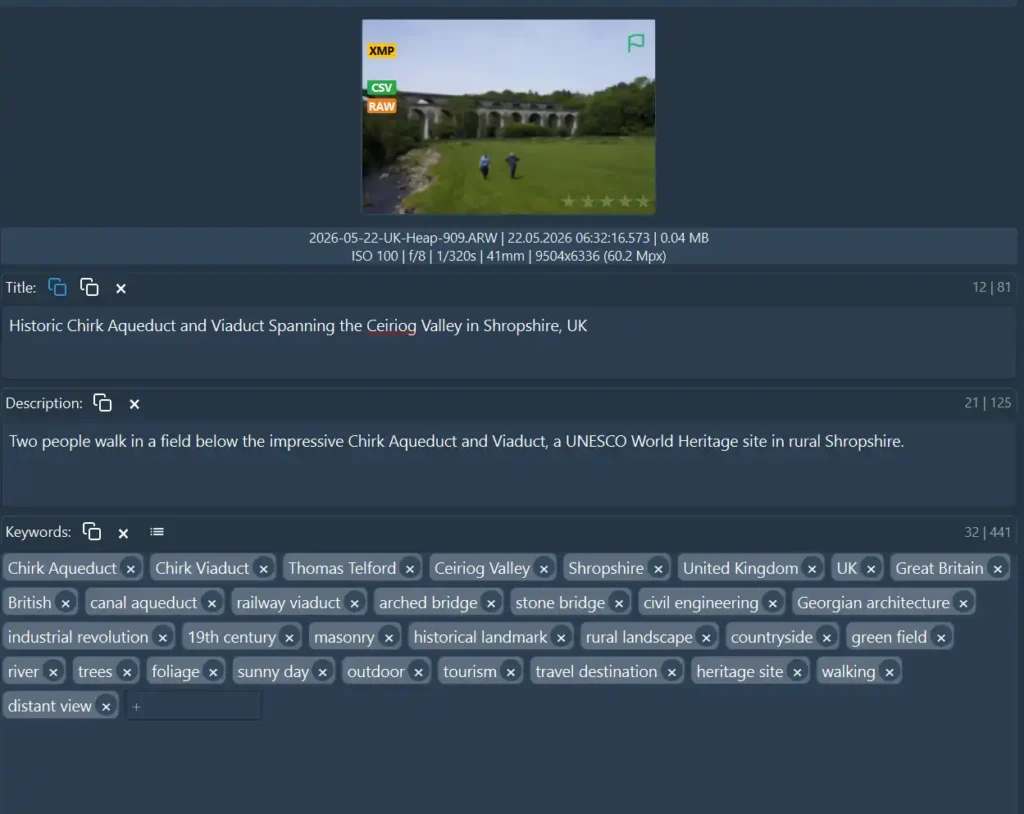
Artush allows you to choose your own AI model (including a local one) and also to directly set up the instructions for that model. My standard stock photo profile was pretty good at generating solid keywords from a few prompts plus the thumbnail of the image, but I felt was lacking some deeper understanding. For instance, I was keywording the famous canal aqueduct and adjacent railway viaduct near Chirk in Shropshire. The aqueduct was designed by Thomas Telford way back in the late 1790s, and the entire spectacular crossing is now a UNESCO World Heritage site. I redesigned my standard stock profile to tell the AI model to do some research before responding with the metadata.
If you are interested, here is the JSON code for that profile. Another free service from Backyard Silver!
USER HINT: {user_hint}
EXISTING DESCRIPTION: {existing_description}
EXISTING KEYWORDS: {existing_keywords}
LOCATION: {loc_hint} (City: {city}, Country: {country})

TASK: Act as an expert Historical Research Journalist and Commercial Stock Photography Metadata Editor. Your goal is to generate metadata in strict JSON format. Use ENGLISH ONLY.

1. RESEARCH-DRIVEN KNOWLEDGE BASE (UNIVERSAL UK CONTEXT):
- CONTEXTUAL INTEGRATION: Analyze the {user_hint}, {existing_description}, and location fields. Prior to generating metadata, internally identify any major historical, cultural, or engineering facts inherently tied to the provided location parameters.
- PROPER NAME EXTRACTOR: If the location is a known historical landmark, civil engineering marvel, or notable geographic feature, cross-reference your knowledge base to include relevant specific proper names, architects, builders, designers, historical eras, or specific bodies of water associated with it.
- SPECULATION BOUNDARY: Do NOT invent completely fictitious details. Only integrate verifiable historical, geographic, or architectural facts derived directly from the provided location or user variables.

2. COMMERCIAL TITLE (MAXIMUM 130 CHARACTERS):
- PARROT BAN: Do NOT repeat the text from {user_hint} verbatim. Expand it into a high-commercial-value string using descriptive variations, proper names, or architectural terms discovered during your internal location research.
- FORMAT: Create a highly searchable commercial sales title focusing entirely on the visual subject matter provided in the variables (maximum 130 characters). Do NOT include dates or editorial prefixes.
- CHARACTER RESTRICTION: Do NOT use semicolons (;) or colons (:) anywhere in the title.

3. MATHEMATICALLY LIMITED DESCRIPTION (STRICTLY 60 TO 150 CHARACTERS):
- PARROT BAN: The description sentence must NOT mirror the exact wording or structure of the Title or the User Hint. Use synonyms and fresh structural composition.
- LENGTH CONSTRAINT: The entire description string MUST be short and punchy, strictly between 60 characters and 150 characters total, including spaces.
- COUNT GUARD: Count the characters carefully before outputting. If the string is over 150 characters, truncate or adjust it to fit the 60-150 range perfectly.
- FORMAT: Write a single, clean, factual commercial sentence. Start directly with the text. Do NOT use city/date prefixes or editorial datelines.
- CHARACTER RESTRICTION: Do NOT use semicolons (;) or colons (:) anywhere in the description.

4. PRIORITIZED KEYWORDS (STRICTLY 35 UNIQUE TERMS ARRANGED BY SEARCH RELEVANCE):
- MUST INCLUDE: All original tags from {existing_keywords}.
- RELEVANCE ORDERING (CRITICAL): The final keyword array must be strictly sorted by commercial concept priority from left to right to preserve high-intent search engine indexing. Do NOT alphabetize. Structure the priority array exactly like this:
  1. Specific Proper Names & Registered Landmarks (e.g., Specific facility names, historic builders/architects, historic designations, specific rivers/canals).
  2. Specific Geography & Administrative Regions (e.g., Local valleys, county names, country borders, regional titles).
  3. Structural Materiality, Style & Architecture (e.g., Type of stone, architectural movement, engineering terms, physical materials).
  4. General Environment, Atmosphere & Travel Concepts (e.g., Time of day, weather, foliage, travel destination keywords).
- COMPOUND PHRASES: Keep multi-word concepts intact. Do NOT split them into single words.
- QUANTITY: Return a JSON array containing EXACTLY 35 unique keyword strings. No more, no less.

5. OUTPUT FORMAT (JSON):
Return a valid JSON object with these keys. Do NOT wrap the response in markdown code blocks (do NOT use ```).
- "title": Commercial title (max 130 characters).
- "description": Commercial description (STRICTLY 60 to 150 characters maximum).
- "keywords": A JSON array of exactly 35 keyword strings, explicitly ordered by commercial importance.
I personally think this is a massive difference from the “cookie-cutter” AI keywording apps that I have tested in the past. They use a profile designed by the developer and cannot be changed. It can be prompted, sure, but the deeper operation of the AI model is hidden from the user. I can modify these profiles as often as I want and keep my favorites available for the next project. Going to Iceland for a week – great, make a profile that is more suitable for keywording images in Iceland with perhaps more local names or local details that you might not have thought about.
Keywording for Fine Art Print on Demand sites
Keywording, and in particular, creating stories in the description that might entice a buyer to put down their money for a print is not the same as the task for stock photography. I’ve written before about why your print images may not appear on Google. Building on that, I wanted to describe my images such that the title fits within the 60 character title that Pictorem uses as the URL, but then have the description much more about the artwork and why it might fit their wall! If I could find a few more keywords that are more aimed at those buyers, all the better.
I already have my stock keywords in Lightroom. So when I export a print file from my original, the metadata is now in the JPEG. If you don’t have that, you can easily do this next step with a blank JPEG with a few modifications to the profile. But for this stage, I simply open the folder that contains my exported print files in Artush, and then apply an AI profile that I wrote for the specific purpose of taking the existing keywords as the source of information about the image, then overwrite the title for a shorter punchier one, overwrite the description with a much longer more “art” oriented description of perhaps how the image might appeal to you, and add up to 10 new keywords that could be used by an art buyer. I don’t want to add “Print’, “Canvas Print” etc. as the PoD website will do that itself. So I end up with something like this:
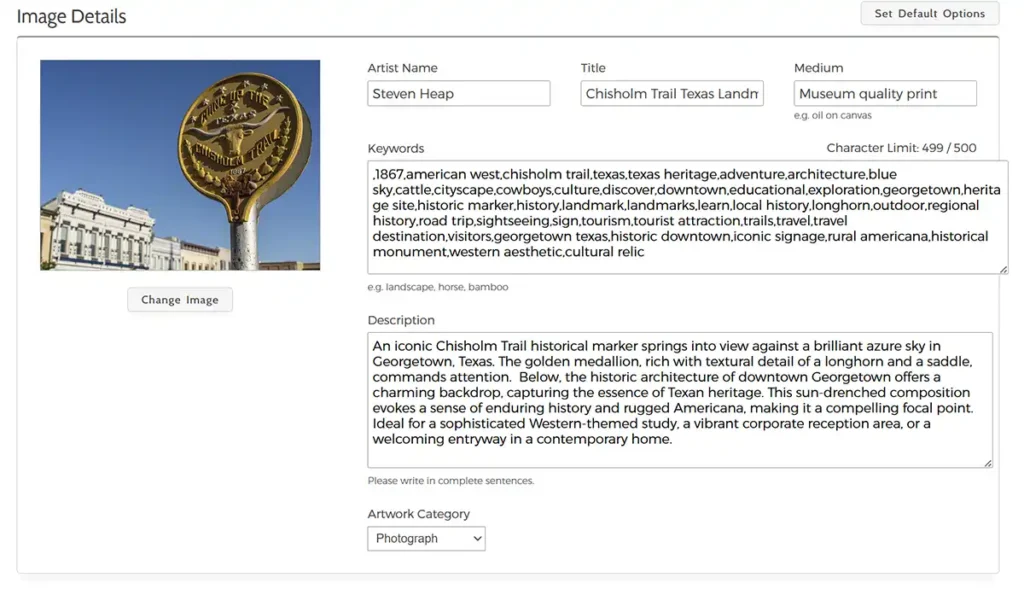
These revised metadata are saved into the JPEG and I upload it to the PoD sites.
And here is that JSON AI profile if you want to use something like this:
USER HINT: {user_hint}
EXISTING DESCRIPTION: {existing_description}
EXISTING KEYWORDS: {existing_keywords}

TASK: Act as an expert Fine Art SEO Specialist and Interior Decor Sales Copywriter. Your goal is to analyze the existing stock description and keywords, ignore any clinical datelines, and translate them into beautiful, premium metadata optimized for retail print buyers on platforms like Fine Art America and Pictorem. Use ENGLISH ONLY.

1. RE-TARGETING PRINCIPLE (FROM STOCK TO ART):
- TRUNCATION GUARD: The title must be punchy, highly artistic, literal, and strictly between 60 and 70 characters total (absolute maximum 70 characters). It must balance descriptive subject matter with elegant mood.
- CHARACTER CONSTRAINT (LETTERS ONLY): The title must contain ONLY letters and standard spaces. Do NOT include dashes (-), colons (:), hyphens, commas, periods, or any other punctuation characters or symbols.
- BUYER INTENT: The tone must speak directly to an art collector, corporate interior designer, or hospitality consultant looking for striking wall decor.

2. DESCRIPTION FORMATTING (THE INVERTED PYRAMID):
- LENGTH TARGET: The description must be highly detailed, vivid, and substantial, between 450 and 600 characters total.
- THE HOOK (CRITICAL): The first 140 characters MUST contain the main visual subject, mood, and atmospheric texture. This is because platforms hide trailing text behind a "Read More" button, making the first two sentences your only pitch.
- THE STORY: Expand after the hook with an elegant narrative describing lighting, composition, or visual drama.
- DECOR CONTEXT: Conclude the description string by suggesting specific interior environments where this print shines (e.g., "A bold statement piece for a modern corporate office," "Perfect for a cozy rustic living room or modern farmhouse kitchen").
- CONSTRAINTS: Maximum 600 characters total. Do NOT include camera settings, lenses, file paths, or dates.

3. STRICT KEYWORD SELECTION (10 BUYER-SPECIFIC TERMS):
Analyze {existing_keywords} and extract the core subjects. Add exactly 10 new unique, high-intent keywords that a buyer would actually type into a search bar to find this *specific* aesthetic.

CRITICAL CONTROLS — DO NOT GENERATE GENERATED PLATFORM WORDS:
- FORBIDDEN WORDS: Do NOT use generic marketplace terms, substrates, or manufacturing buzzwords. Absolutely ban the words: "canvas", "print", "wall art", "decor", "frame", "poster", "gift", "interior design", "affordable", "premium", "unique", "photo", "photography", "image", "picture".

ALLOWED KEYWORD CATEGORIES (USE THESE TO COMPOSE THE 10 NEW TAGS):
- Specific Geography/Locale: (e.g., "Hutto Texas", "Cotswolds", "English countryside").
- Time/Atmosphere/Season: (e.g., "golden hour", "overcast sky", "summer afternoon", "misty morning").
- Color Palette Dominance: (e.g., "ochre tones", "industrial gray", "vibrant blue sky", "monochromatic blue").
- Art Style/Aesthetic: (e.g., "industrial chic", "minimalist landscape", "rural Americana", "architectural study", "rustic charm").
- Focal Subject Textures: (e.g., "steel framework", "weathered wood", "golden wheat field", "geometric lines").

4. OUTPUT FORMAT (JSON):
Return a valid JSON object with these exact keys. Do NOT wrap the response in markdown code blocks (do NOT use ```).
- "title": Artistic, literal, SEO-friendly title consisting of LETTERS AND SPACES ONLY (Strictly 60-70 characters maximum, no punctuation).
- "description": Vivid fine art description with a strong 140-character hook, visual story, and room placement suggestions (Between 450-600 characters).
- "keywords": A JSON array containing all original tags from {existing_keywords} plus exactly 10 new custom buyer-intent strings following the strict guidelines above.
I hope you found this useful – if you have more questions, please let me know in the comments.
Try the ArtushVision AI App for yourself- Affiliate Link. It all helps keeping my website active.