
Earnings from online photography sales – September 2026
A good month for stock photo sales
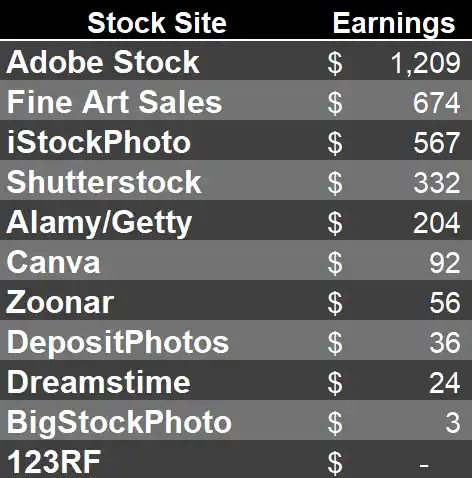
A surprisingly good month for stock photo licensing income in September 2026 with a total for the month of $3309! It started well with higher-than-normal sales in the third week, in particular, and then Getty/iStock reported a much better earnings total (for August) of $566. Normally, this is in the $3-400 range. I checked to see if it was a one-off big sale, but even better, it seems to be steady sales of some of the newer images I uploaded earlier this year of data centers.
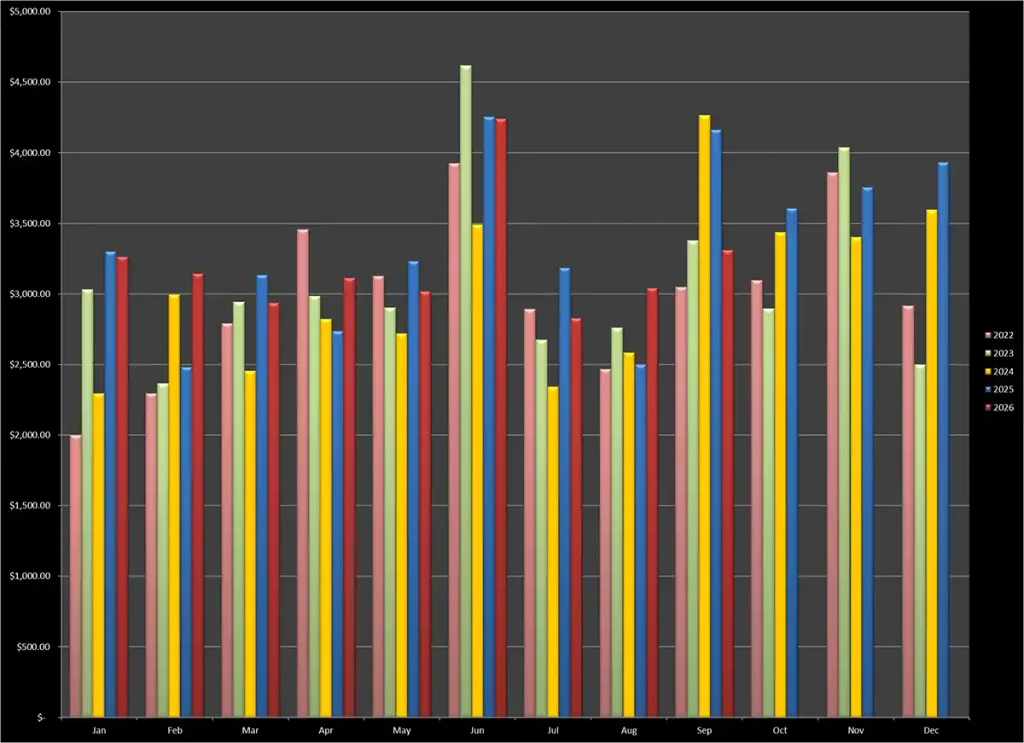
The end result of $3309 included $674 from what I call fine art sales – print on demand sites etc. Here is my normal graph showing the history of these earnings. The past two Septembers were much higher. 2025 was the result of a fantastic bunch of print sales that month, 2024 was a big Adobe free image buyout if I recall.
Agency Performance
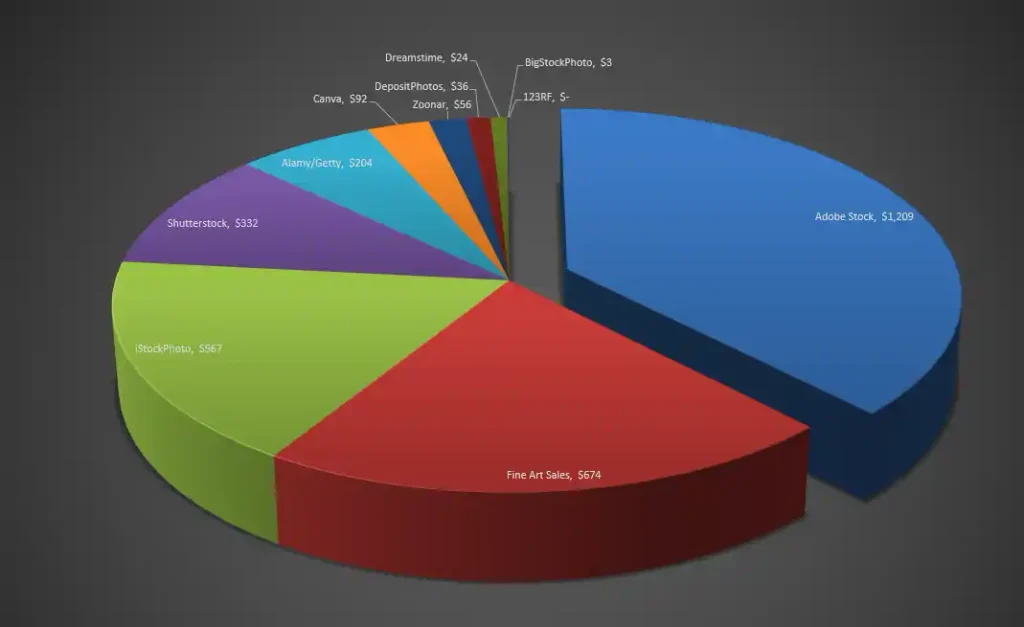
Here is a chart and a pie chart showing the income from each of the main agencies plus my fine art efforts:
Processing and keywording updates
I spent two weeks in the state of Oregon in late August/early September and had a fantastic time driving almost 2000 miles around this very picturesque state. As usual, I’ve written one of my travel stories about this Oregon Photography road trip on Backyard Image but haven’t had the time to put any of the best images on my print on demand sites yet. But I did manage to “develop” 540 images from the trip that I thought were worthy of uploading to stock agencies. As we all know, the processing is often the interesting part of the process as we try to tease the best image we can out of a photo and then the task of keywording and describing them can add a real damper to the rest of the month. But, as usual, I have really got to know (and like) ArtushVision AI to help me do that smoothly. This is growing into a very comprehensive image management system with a new release out shortly that adds a great deal of competitive market intelligence on what specific images have a better chance of selling on agencies than others, and what are the best keywords and sort order to maximize your chances of a sale.
I’ll write more about that when it is released (I’ve been testing an early version this past week), but what I really like about the system is that you, as the expert, are fully in control. You get to tell the AI model exactly what you want and choose which AI model is best for your work. I decided recently to use Google Gemini-3.8-flash to process the metadata. It is a bit more expensive per image (still less than 1c) but it provides much better results with tight titles and descriptions and well-ordered keywords tailored specifically to the priority order used by Adobe and Alamy. In this example, I simply noted the beach where I took this photo and the rest was added by the AI.
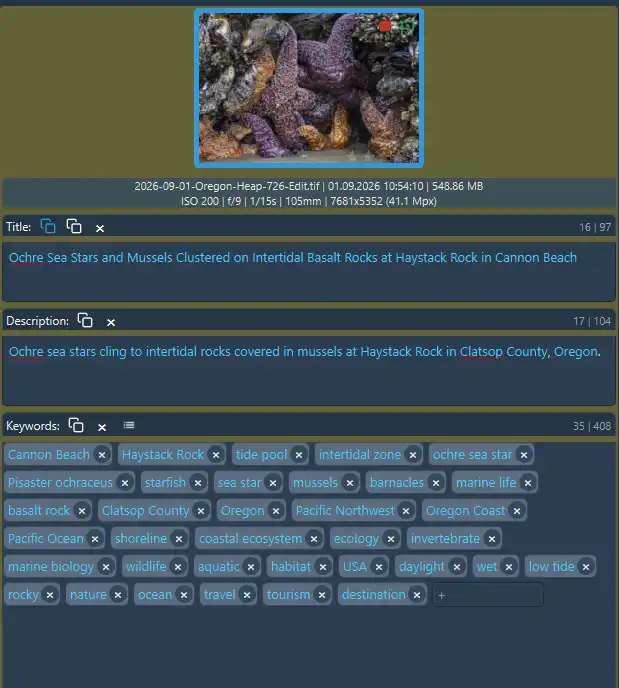
I’m not saying this is a great stock photo, but having taken it, it has only cost me about $0.003 to describe and around 1 minute of my time. Over the past week, I have keyworded my 500+ images and have most of them online. Even Adobe Stock has accepted more than 95% of them. So, if you are interested in solving your metadata issues (and uploading issues) then please read my fuller review of this application or just use my affiliate link to purchase the app for a one-off payment of $39.99. You won’t regret it!
Using AI to add metadata to your images
There are many different applications out there to use AI to keyword your images. As you saw immediately above, I use ArtushVision AI as it does everything I want. But if you use something else or can directly ask your chosen AI model for keywords, I developed a new profile of instructions for the AI model that I access via Artush. I asked Gemini to review the contributor guidelines for Adobe, iStock and Shutterstock to develop this. As a free gift (!) here it is:
👉 Click to view/copy the Universal US Commercial & Travel Profile Prompt
USER HINT: {user_hint}
EXISTING DESCRIPTION: {existing_description}
EXISTING KEYWORDS: {existing_keywords}
LOCATION: {loc_hint} (City: {city}, Country: {country})

TASK: Act as an expert American Historical Research Journalist and Commercial Stock Photography Metadata Editor. Your goal is to generate metadata in strict JSON format. Use ENGLISH ONLY.

1. RESEARCH-DRIVEN KNOWLEDGE BASE (UNITED STATES GEOGRAPHY & LANDMARKS):
- CONTEXTUAL INTEGRATION: Analyze the {user_hint}, {existing_description}, location parameters, and image content. Internally identify key US geographical, geological, architectural, or environmental context (e.g., specific state parks, wilderness areas, river corridors, coastal features, waterfalls, mountain ranges, city skylines, or historic sites).
- PRIMARY SUBJECT ISOLATION: Distinguish between the primary physical feature dominating the frame (e.g., waterfall, sea stack, headland, building, bridge, forest canopy, lake, river) and secondary context (e.g., parking area, campground, trail, user hints). Focus metadata primarily on the main visual subject.
- SPECULATION BOUNDARY: Do NOT invent fictitious details or facility names. Only integrate verifiable geographic, environmental, or historical facts derived directly from the visual subject and location parameters.

2. COMMERCIAL TITLE (MAXIMUM 130 CHARACTERS):
- SUBJECT MANDATE: Focus directly on the primary visible natural, architectural, or structural subject in the frame.
- PARROT BAN: Do NOT repeat the text from {user_hint} verbatim. Expand it into a high-commercial-value sales string using precise geographic, structural, or natural terminology.
- PUNCTUATION RESTRICTION: Do NOT use semicolons (;), colons (:), or commas (,) anywhere in the title (to prevent CSV parsing errors). Maximum 130 characters.

3. MATHEMATICALLY LIMITED DESCRIPTION (STRICTLY 60 TO 150 CHARACTERS):
- NO MARKETING FLUFF (CRITICAL): NEVER use travel-brochure language such as "Discover the scenic beauty...", "Experience the tranquility...", "Explore the stunning views...", or "A picturesque view of...".
- FACTUAL VISUAL MANDATE: State directly what is happening in the frame. Name the specific primary natural feature, building, or landmark and its precise location (e.g., state park, city, river, county, or state).
- LENGTH CONSTRAINT: The entire description string MUST be short and factual, strictly between 60 characters and 150 characters total, including spaces.
- PUNCTUATION RESTRICTION: Do NOT use semicolons (;) or colons (:) anywhere in the description.

4. PRIORITIZED KEYWORDS (EXACTLY 35 UNIQUE TERMS, ABSOLUTE MAX 49):
- MUST INCLUDE: All original tags from {existing_keywords}.
- TITLE MIRRORING: Every essential noun, place name, or subject mentioned in your Title MUST also be present in the keywords (as Adobe Stock does not index Titles for search).

- BALANCED COMPOUND & NOUN RULES:
  - PHYSICAL VISUAL SUBJECTS (COMPOUNDS ALLOWED): Use tight 2-word compound phrases for specific physical features visible in the frame where splitting them causes ambiguity or loses search intent (e.g., "sea stack", "waterfall", "tide pool", "coastal headland", "state park", "data center").
  - PROPER NAMES & LOCATIONS (COMPOUNDS ALLOWED): Keep multi-word place names intact (e.g., "Multnomah Falls", "Cannon Beach", "Pacific Northwest", "Columbia River Gorge", "San Francisco").
  - ABSTRACT & GENERAL TERMS (SINGLE WORDS PREFERRED): Keep general elements, environments, and attributes as single words (e.g., "cascade", "ocean", "coast", "forest", "stream", "nature", "water", "wilderness").
  - SINGULAR FORM PREFERRED: Use singular nouns as default (e.g., "waterfall", "rock", "tree") as stock engines auto-pluralize.
  - FORBIDDEN: Do NOT create multi-word abstract or marketing phrases (e.g., "natural beauty", "scenic landscape", "outdoor adventure").

- MACRO-GEOGRAPHY CONSOLIDATION (NO CLUTTER):
  - FORBIDDEN: Do NOT include "United States", "United States of America", "America", or "US".
  - CONSOLIDATED TAG: Use ONLY the single keyword "USA".

- TOP 10 HIGH-WEIGHTING FILTER (CRITICAL ADOBE / ALAMY SEARCH SLOTS):
  - POSITIONS 1-10: Must contain strictly the highest-intent terms: the specific landmark/place name, primary physical subjects, and key actions/features.
  - FORBIDDEN IN POSITIONS 1-15: Generic environmental or lighting words like "sunny", "daylight", "bright", "blue sky", "day", "outdoors", "clear sky", or "sunshine" MUST be pushed to positions 20-30!

- RELEVANCE ORDERING (CRITICAL LEFT-TO-RIGHT HIERARCHY):
  1. Positions 1-5 (Hyper-Local Pinpoint Names & Primary Visual Subject): Exact feature, park, waterfall, beach, building, or landmark names.
  2. Positions 6-10 (Core Physical Attributes & Features): Secondary visual objects dominating the frame (e.g., "cascade", "cliff", "river", "basalt", "facade").
  3. Positions 11-18 (Regional Geography & States): County, regional, or state identifiers (e.g., "Oregon", "Pacific Northwest", "Columbia Gorge", "Texas").
  4. Positions 19-25 (Environmental & Conceptual Features): Broader nature, technical, or geological terms (e.g., "wilderness", "hydrology", "geology", "forest", "infrastructure").
  5. Positions 26-30 (Macro-Geography & Lighting): Broad political entity ("USA") and environmental lighting ("daylight", "overcast", "sunny").
  6. Positions 31-35 (Broad Genre & Travel Concepts): End the list with relevant broad visual category/genre terms (e.g., pick applicable terms from: "landscape", "seascape", "cityscape", "architecture", "nature", "scenery", "outdoors") alongside general travel tags ("travel", "tourism", "destination").

- QUANTITY: Return a JSON array containing EXACTLY 35 unique keyword strings. Never exceed 49.

5. OUTPUT FORMAT (JSON):
Return a valid JSON object with these keys. Do NOT wrap the response in markdown code blocks (do NOT use ```).
- "title": Commercial title focusing on the primary subject (max 130 characters).
- "description": Direct, factual commercial description (STRICTLY 60 to 150 characters maximum).
- "keywords": A JSON array of exactly 35 keyword strings ordered by search intent priority.
Stock Photo File Upload Status
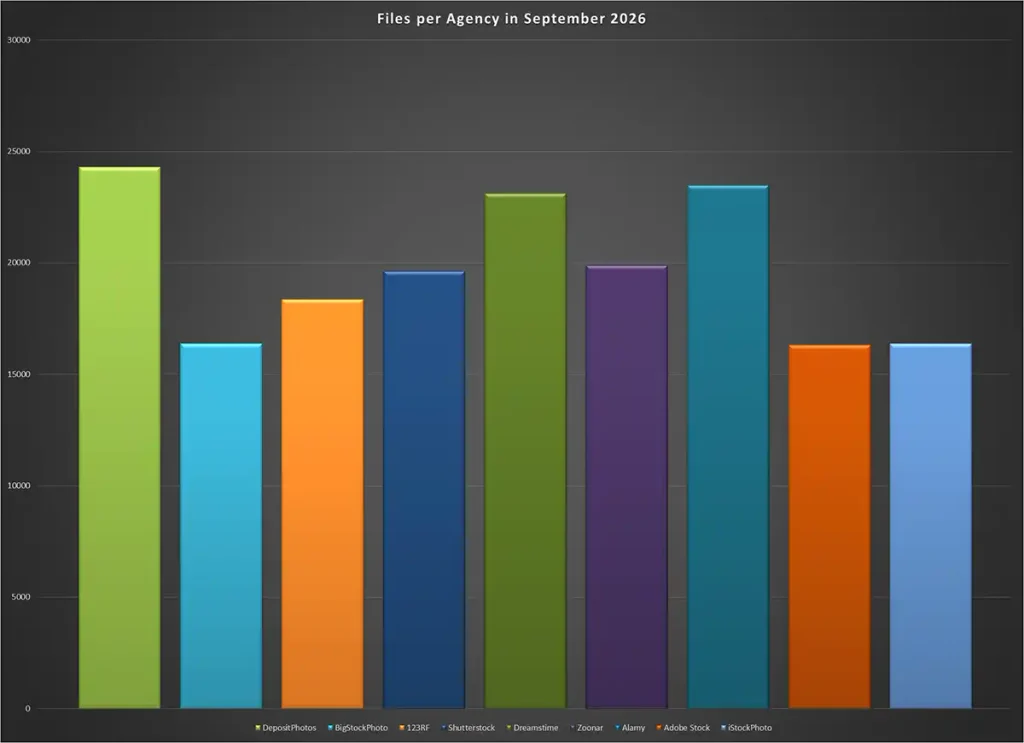
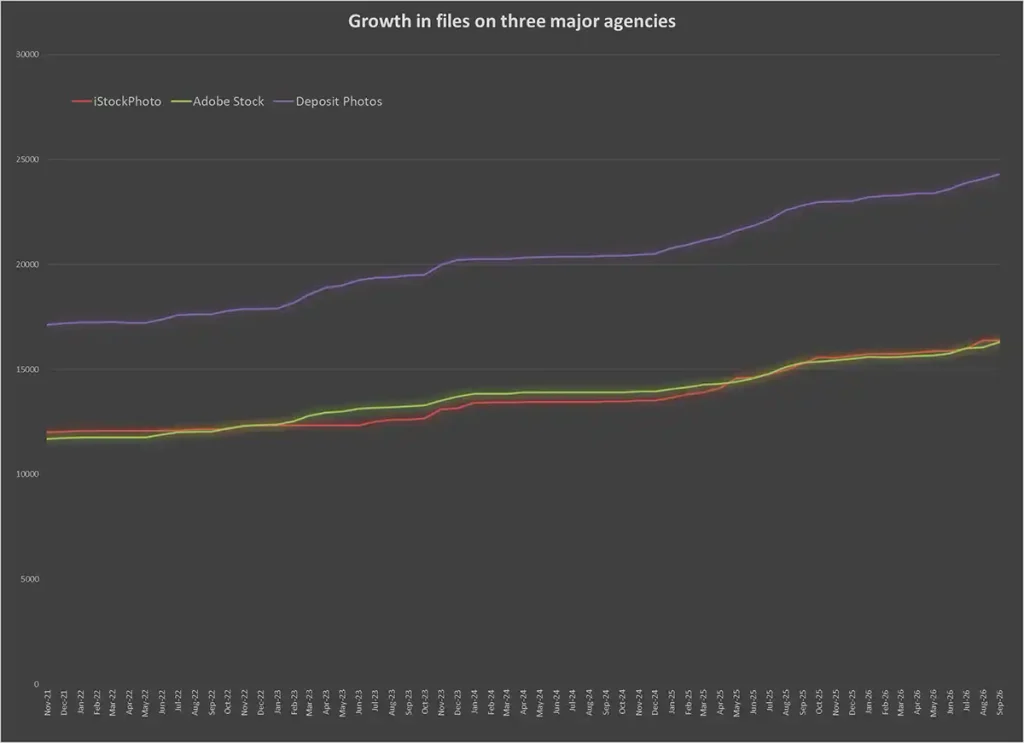
As a result of my uploading activities, my file count has increased on those agencies that are quick with their reviews. Here is the current summary of the number of assets on the main agencies and then a growth chart. This is a game where you need to keep uploading to keep up the earnings.
One-off Payments in the month
I received $78 from Firefly training on Adobe and also $80 for a few images that they wanted to add to their free image collection. The payments are included in the overall total, although, as usual, I spread them out over 12 months in my stock vs fine art graph to avoid large peaks which were not really earnings in that month.
High priced stock photo licenses
Each month I have a look at the high-priced licenses as those make a big difference to the monthly earnings total. Tongue in cheek a bit when I say high-priced! I’m talking about images or videos that have licensed for more than $10!
Alamy was the leader this month with two images for $40. I did manage to just squeeze into their category where I get the higher payout. I know that many contributors were really annoyed by that change – another sign of the difficulties the industry is in. The first image is one of those shots that you take as you are visiting a place, with very few hopes of it selling. It was an old building in Williamsburg that was in the process of being moved to a different site. Editorial, of course.

The second was a subject that is currently selling well for me – data center growth. This was also a $40 sale.

I usually get a few reasonable sales on Shutterstock as well to make up for the poor results from all the 10c downloads. This one sold for $34

Fine Art Efforts – a slow summer
August and September have not been great for fine art print sales. Not surprising, perhaps as people are going on vacation and not thinking of decorating their homes or buying gifts. As a result, I made a loss on my Etsy store of $40 due to my continued use of Etsy ads and only one 11×14 inch print sale to show for it.
I did sell three pretty big prints on Fine Art America in September, though, but nothing on Pictorem. I’m hoping that the cooler weather and the approach to Christmas will boost sales in the coming months.
Overall Earnings from Online Photography Sales
My graphs above simply report gross income coming in. But the one-off payments for AI training or Free image buyouts tend to hide underlying trend. So I keep a different graph which removes those one-off payments and spreads them over the next 12 months. I also split out the stock activities from the fine art print sales.
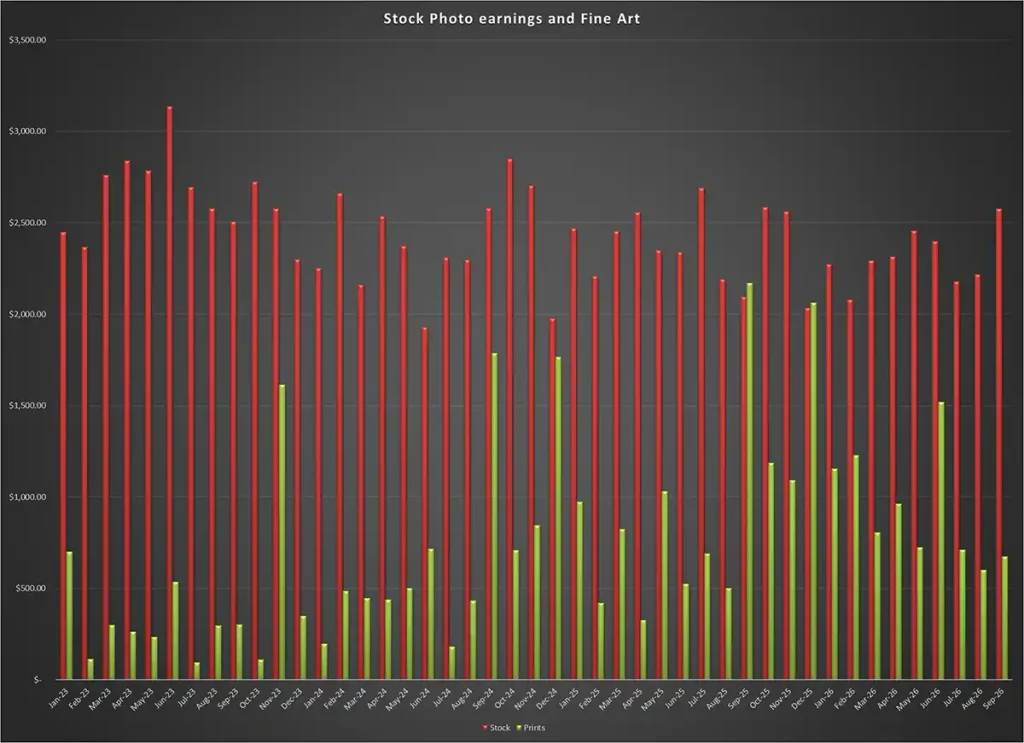
I think this is showing that my fine art print sales are variable but continue to give me quite a boost to overall income. Stock income does have a summer peak and another over the winter and it is not particularly different looking back over the past 3 years or so. My continued uploads to the agencies is countering the growth of competition from other contributors and from AI efforts in this space. I think my focus on travel photography helps, and I’m hoping that will continue for a few more years. For now, there is still life left in stock photography!


Can pictorem be added to artushvision as an upload link so we can use its ai capabilities?
I’m not really sure what you mean there. I do rework the images that I am going to upload to Pictorem and FAA to make the metadata more appropriate for print buyers, but the AI engines are the ones from Google, ChatGPT etc. You get to choose which AI model to use depending on how much you want to spend and the amount of intelligence that the model brings to bear on your image and the metadata. I wrote about that here: https://backyardsilver.com/custom-ai-keywording-stock-fine-art-metadata/